From a connected account to a brief
Seven steps, in the order a real week uses them.
It reads the ad, not the file name
Knack looks at the actual image and video frames and tags every ad across eleven dimensions, each from a closed list so two taggers land on the same word: who it speaks to, what motivates them, format, angle, hook, offer, talent, production, pacing, tone and call to action. Who it speaks to, what motivates them and the format combine into a concept, which is the unit a brief is written at. Whether the ad is video, static or carousel, and whether it ran as an owned asset or a creator partnership, come from the ad object rather than the picture. Tags are kept, so a creative is read once and the read survives every pull.
- Nothing depends on your ad names, so an account inherited from another agency works on day one.
- A naming convention decays the moment a freelancer joins. Reading the frames doesn't.
Every ad gets a verdict, typed and sized
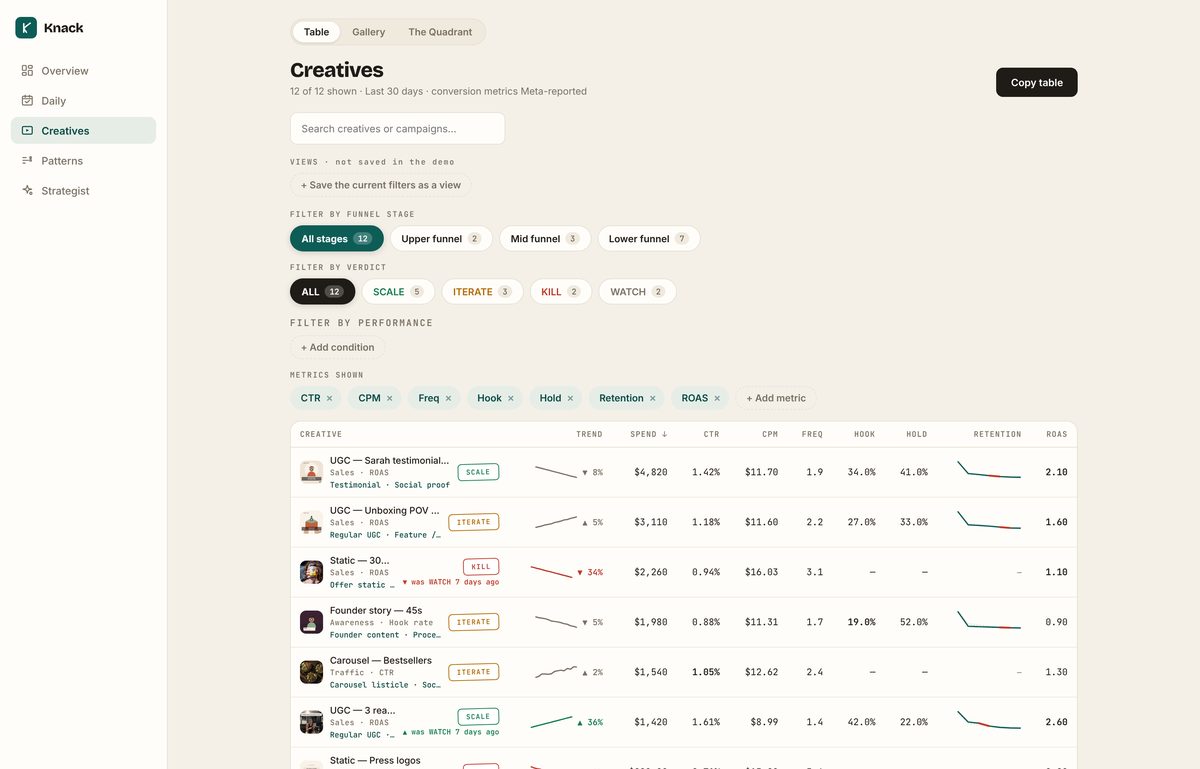
Scale, iterate or kill, with the reasoning. A kill names its cause: delivery, quality, cost or fatigue, and whether the idea deserves another execution. An iterate names the stage that failed: the first three seconds, the middle, the click or the landing page. A scale carries its sizing rule: 20% every five days while frequency holds under 3.
- Each ad is judged on the metric its ad set optimised for, ahead of the campaign objective: a landing page view ad set inside a sales campaign is read on CTR. A top of funnel video is never marked down for not selling.
- Set a target CPA or breakeven ROAS and lower funnel verdicts become absolute. Outside the target is never scale.
- Three answers to "is it working yet": learning, starved, or too early to call. None of them is a guess, and the floor is published: 3,000 impressions, and five purchases where purchases are reported. Under it a creative is held out, not ranked.
- Conversion metrics are labelled Meta reported, because they are.
- Every read is kept. A verdict that moved since the previous read says so, with the direction and how long ago, in the table, on the creative and in the client report.
- The read ends in two or three production briefs grounded in this account, each one something a team could shoot on Monday, and any creative can be asked about directly: why this verdict, what to change first, what the next version should be.
One ad winning is trivia. A pattern with a win rate is a brief.
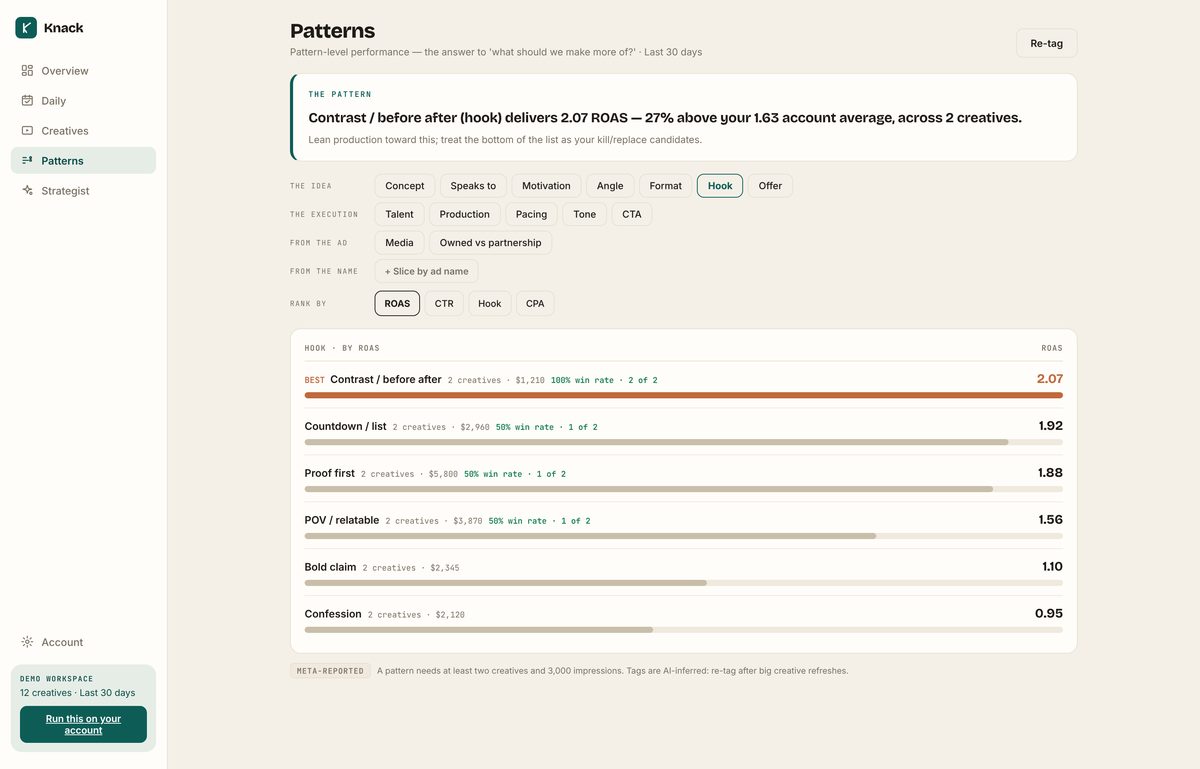
Knowing that every winner this quarter was lo-fi founder content and every loser was polished studio work is a brief. Patterns ranks performance by any dimension, concept included, and prints the win rate beside every group: how many of its creatives beat the account on their own metric. A spend weighted average can be carried by one big ad. A win rate says whether the pattern repeats.
- Slice by owned assets versus creator partnerships.
- Thin groups are hidden, so a two ad "angle" can't fake a trend.
Where each video loses people
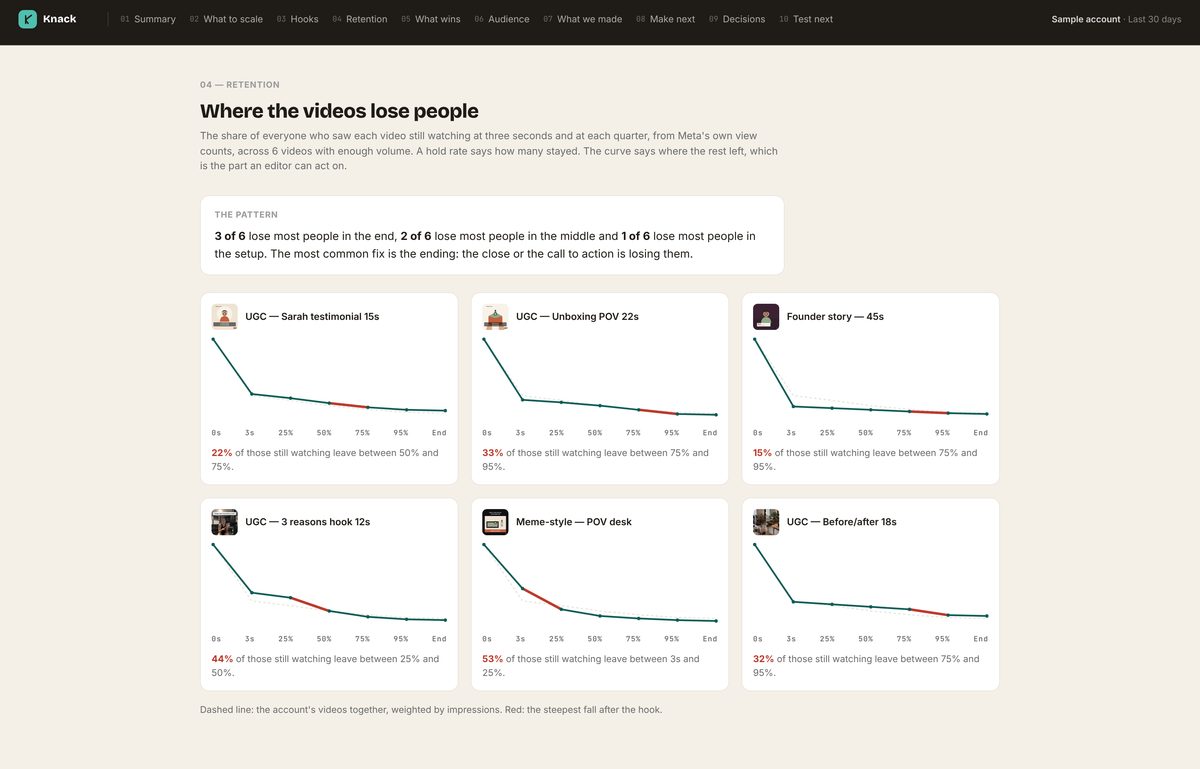
Hook rate says how many people watched past three seconds. Hold rate says how many of those stayed to the end. Neither says where the rest left. Knack draws a retention curve for every video from Meta's own view counts at three seconds and at each quarter, lays it over the account's, and marks the segment that loses the largest share of the people still watching. A video that collapses right after the hook has a setup problem. One that holds to three quarters and then falls has an ending problem. Same hold rate, opposite brief.
- The fix is named: the setup, the middle or the ending, in the words an editor cuts to.
- The client report counts videos by stage, so "three of six lose people at the end" becomes the brief for the next batch.
- The Quadrant still plots every video by hook against hold, sized by spend, for the one-glance view.
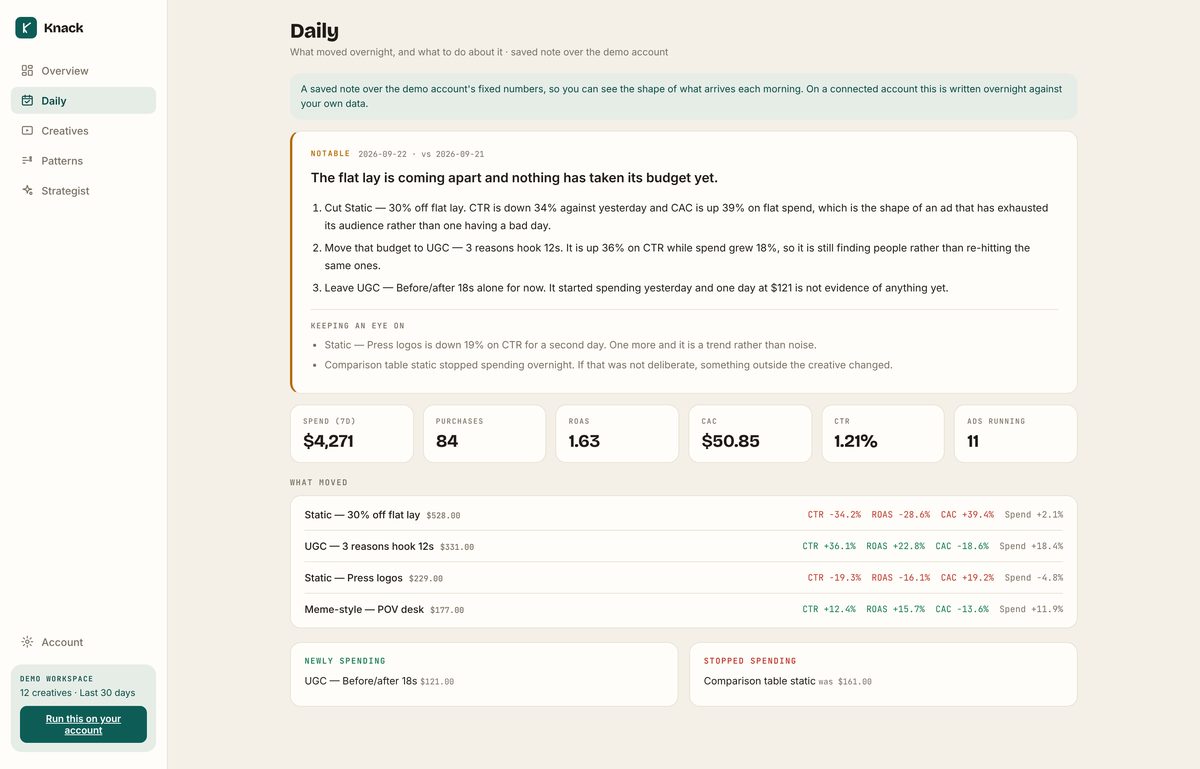
The account writes itself up overnight, and tells you before you ask
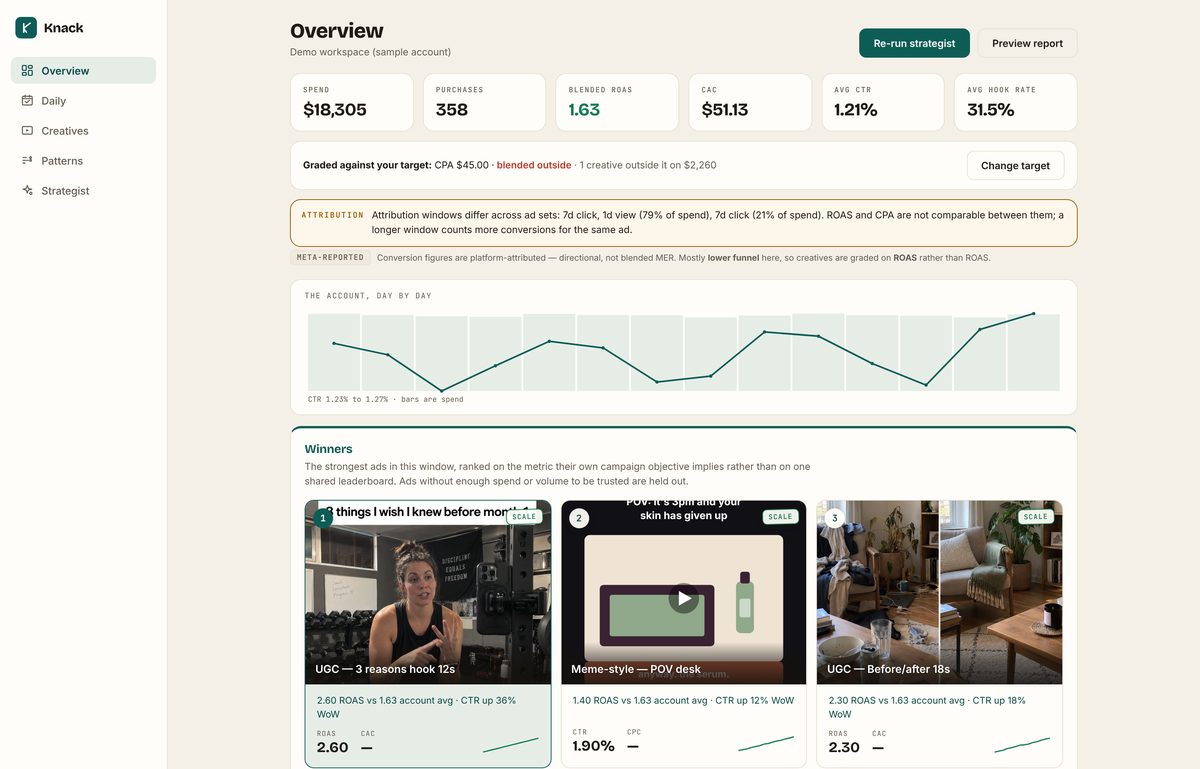
Switch on daily analysis and Knack pulls the last seven days each night, compares it against the night before, and writes up what moved. On mornings when the read finds something notable or urgent, the note is in your inbox before you open anything; quiet nights send nothing. Set an alert and the morning it matters, that email is there too: a winner stalling, fatigue crossing a line, spend concentrating, an account dropping out of analysis.
- Fatigue is read the way a buyer reads it. CPM rising while CTR holds is the leading sign and is flagged first. The frequency band depends on whether the campaign is meant to repeat.
- Only ads carrying real spend can be movers, so a 900% swing on $3 never makes the note. Conversions are read from a window that ended before Meta's attribution lag, so late purchases never show up as a drop.
- When nothing happened, it says nothing happened. A rule that has fired stays quiet for three days rather than repeating itself.
- Running several accounts? All accounts puts every overnight read on one screen, urgent first, with the ones not yet on daily analysis named.
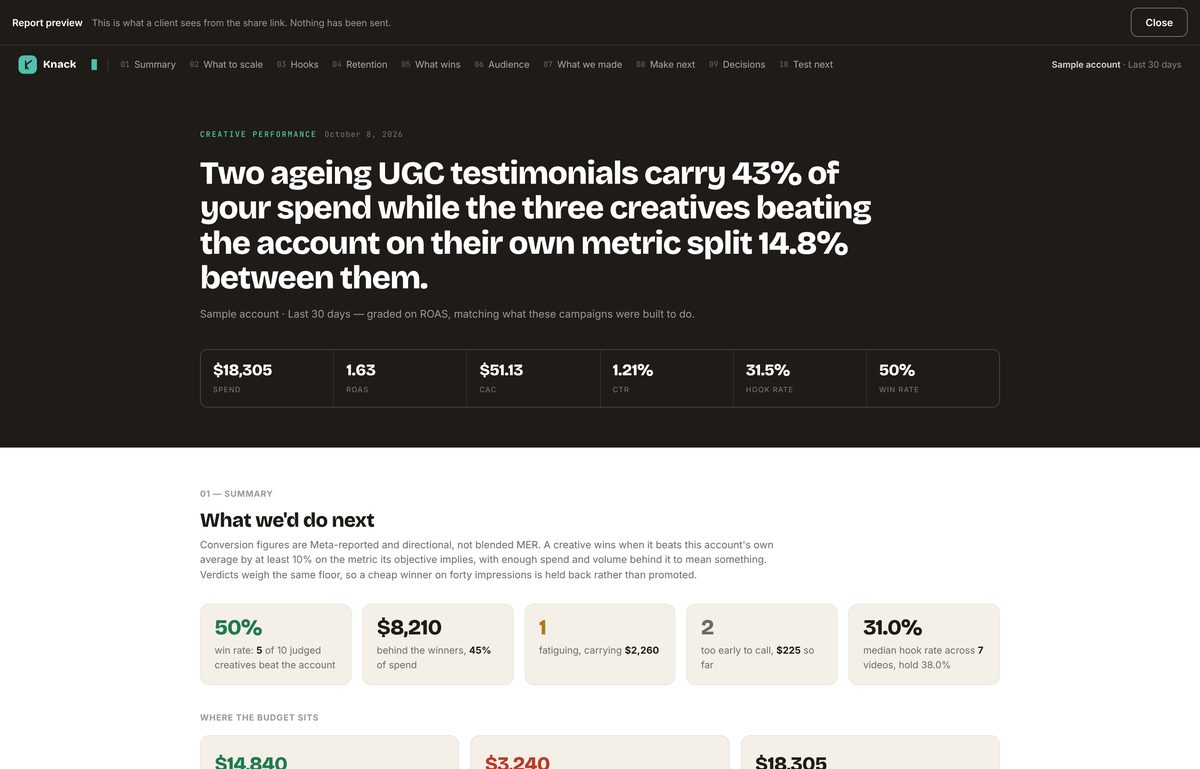
A report that answers the strategist's questions
Not a metrics dump. It opens on the scorecard: win rate, the spend behind the winners, what is fatiguing and what is too early to call. Then the six openings that stop the scroll with hold rate beside each, where the videos lose people and which stage to fix, what moved since the last window, which kinds of creative win and how often, who the work speaks to, the briefs you want in production next, and the decisions: what to stop and why, what to fix and where, what to leave alone.
- Preview it in the app before anything is sent, then share one link. No login for the client, nothing to export.
- Snapshotted at the moment you share, so the numbers still say what they said when you sent it.
- Expires after 90 days by default, revocable any time.
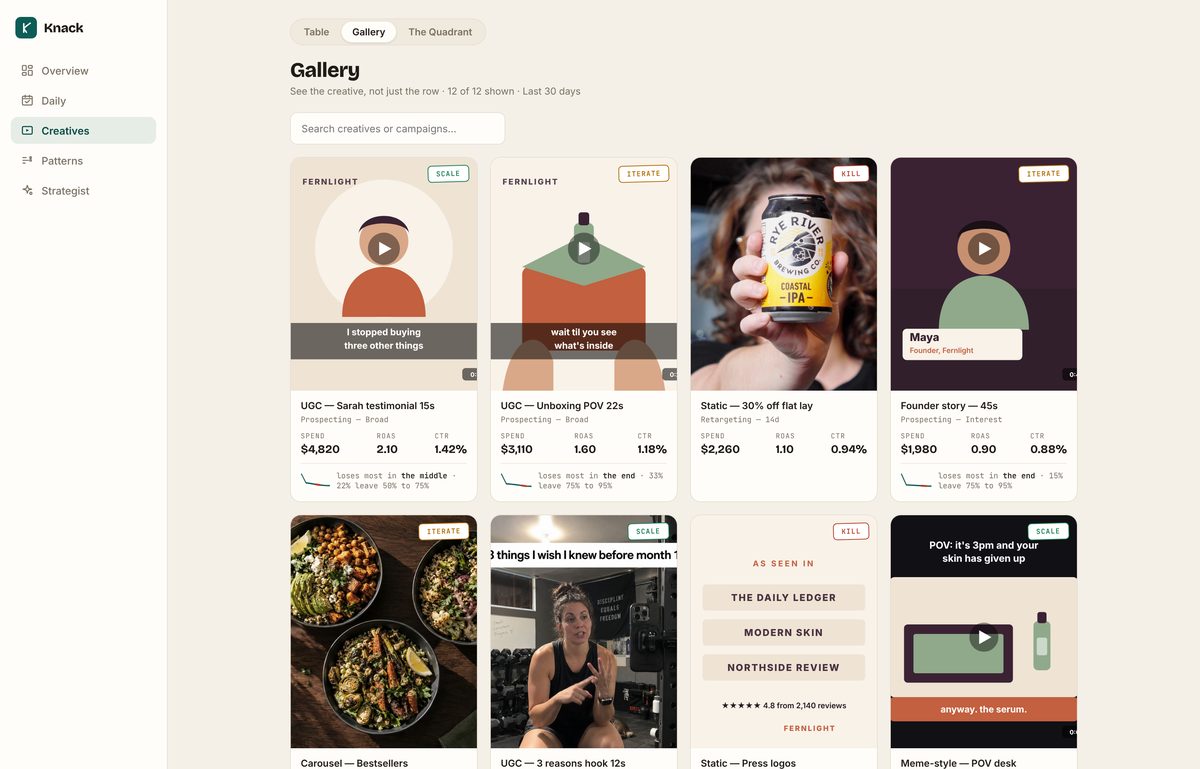
At a size you can actually judge
A gallery of the creative at full size next to its numbers, a table you can filter by any threshold ("spend over $1,000 and ROAS under 1.5") and save as a named view, and a drill down on every creative: where it ran, who saw it, and how it moved against the window before.
- Compare any window against the one before it, measured identically, with the change filterable like any other column.
- Copy the table as rows for a spreadsheet, or as sentences for a message, exactly as filtered.
How getting started works
There is nothing to install and no tracking to add. Knack reads what Meta already knows.
Look around first
We walk your creative and media team through it on your own account.
Connect Meta
New accounts connect with us on the demo call. Access is read only, so Knack never creates, edits, pauses or spends.
Get verdicts
Your creative is read and graded overnight. With daily analysis on, the account writes itself up each night after that.
Send the report
Share a link with a client or a founder when you want them to see the thinking, not the spreadsheet.
How your data is handled
Worth reading before you connect anything, and short enough that you can.
Read-only, and only ads data
Knack asks Meta for permission to read ad performance, and nothing else. There is no code path anywhere in the product that creates, edits, pauses or spends. The app shows you exactly which permissions were granted, so a declined one is visible rather than turning into missing data.
Your access token never reaches a browser
It's stored encrypted and used only by Knack's own servers. Shared client reports carry a snapshot of the numbers rather than live access, so a link you send a client can never be used to reach your ad account.
Disconnect and it stops
Revoke Knack in your Facebook settings or ask us to delete the workspace, and the stored data goes with it. Shared report links expire on their own and can be revoked before that.
What Knack won't tell you
Knack works from platform-reported conversions. Those are directional and they over-credit themselves. An ad that looks like it is driving revenue in Ads Manager may be harvesting demand that was already there. Knack tells you which ads are doing the work relative to each other, and what to make next. It does not tell you whether the channel is incremental. That's a different question and it needs a different instrument: a holdout test, a geo split, an MMM. Anyone selling you creative analytics as a substitute for incrementality testing is overselling.
What creative analysis does do is stop you spending the biggest lever in the account blind. Here's the research on how big that lever is.
See what your account really thinks.
Book a walkthrough on your own data, with your creative and media team in the room.